


Share


Author
In this article
We get it, you’re running a business not a data center.
Your business relies on Microsoft 365 and your M365 data is critical to your ongoing operations. Practically everything your people touch day to day lives inside Microsoft 365. Email, documents, SharePoint libraries, OneDrive, Exchange, shared calendars, the whole lot.
But did you know there’s a gap?
And many organisations we encounter only discover the gap only after the incident has already happened. Their security perception is disconnected from reality (or ownership just isn’t asserted), and let me tell you… ignorance just isn’t bliss in this scenario.
This isn’t an “oh well, we might have to call Microsoft Support” scenario. Rather it’s a full Business Continuity Plan that’s missing, including appropriate backups and a properly tested disaster recovery strategy that has been properly documented.
The ASD Annual Cyber Threat Report 2024-25 paints a confronting picture: 84,700 cybercrime reports last financial year (roughly one every six minutes), 1,200 cyber security incidents responded to by the ACSC (up 11%), with 11% involving ransomware. The average cost per cybercrime for small business: $56,600 (up 14%).
And since 30 May 2025, businesses turning over $3 million or more must report ransomware payments under the Cyber Security Act 2024.
Despite those numbers, there is still an enormous disconnect between “we use M365” and “we could actually recover our M365 data after an incident.” Far too many organisations confuse retention settings with backup, or treat the recycle bin as their disaster recovery strategy. And that confusion gets more expensive every single year.
Before we dig into the detail, here is the short version for anyone pressed for time:
- Microsoft’s Shared Responsibility Model means your data is your problem. Microsoft secures the platform infrastructure, but you (or your MSP) are responsible for protecting the actual data itself.
- Retention policies are not backup. Recycle bins, version history, and litigation hold are governance tools. They were never designed for disaster recovery.
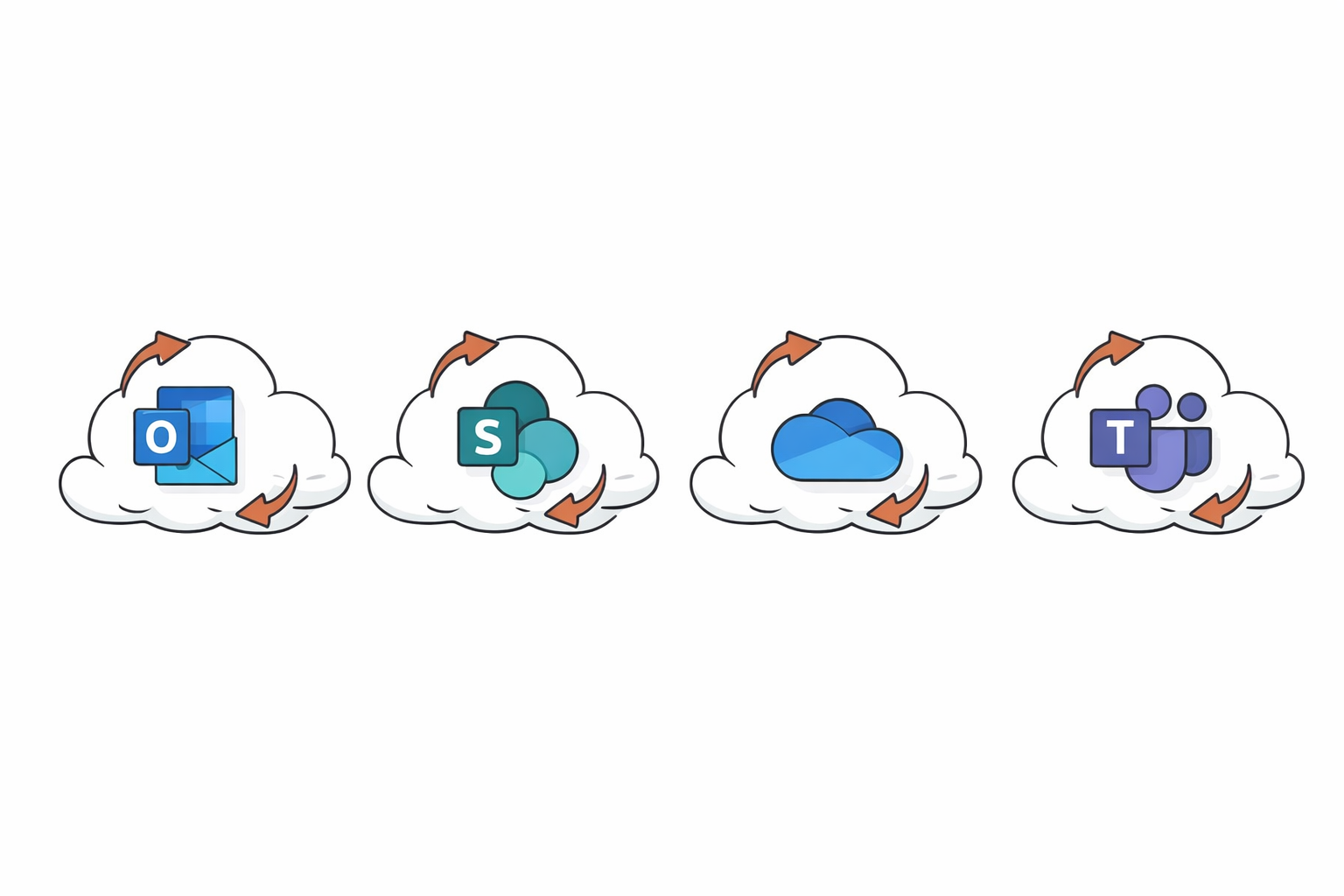
- M365 Backup is now GA and covers SharePoint, OneDrive, and Exchange with fast restore, granular recovery, and built-in immutability.
- Teams backup is still missing. For Teams-heavy organisations, that is a significant blind spot that needs addressing.
- One-year max retention may not satisfy Australian compliance obligations under the Privacy Act, APRA CPS 234, or industry-specific retention requirements.
- The right strategy depends on your workloads, compliance obligations, and risk appetite. A lot of organisations end up with a layered approach: native M365 Backup for fast operational recovery alongside a third-party tool for long-term retention and off-site copies.
This article is what we tell our clients when they ask us about it. No vendor spin. What native Microsoft 365 Backup can actually do for you, where it falls short in practice, and how to put together a strategy that keeps you compliant, insured, and recoverable.
💡 Expert Insight: Alex Stewart, General Manager
In the M365 shared responsibility model it’s vitally important to understand that you are responsible for your data, your retention policies and the backup and recovery process.
Implement M365 backups immediately, and ensure that they are working, it’s important to check and monitor backups so that when they are needed they can perform the task intended.
- When setting up M365 backups work through a checklist.
- Deploy the backups across the whole M365 platform.
- Enable for all users and all sites.
- Verify the backups have worked, perform a test restore.
- Set your desired retention policies.
- Continue to check and monitor the backups at set frequencies to validate they are working.
Why Your Existing M365 Protections Aren’t Backup
Microsoft Office and SharePoint, are built on a Shared Responsibility Model.
Microsoft is responsible for the security of the hardware and software infrastructure upon which M365 sits. However, the business, and in this case the MSP looking after the business, are then responsible for the security of the data within the M365 platform. The retention policy is not a form of business class backup, and nor is the Recycle Bin, version history and litigation hold a form of Business Continuity and Disaster Recovery plan.
M365 has never been designed for disaster recovery.
M365 Backup is now generally available, providing fast restore, granular recovery and built-in immutability for SharePoint, OneDrive and Exchange. Teams is still not covered. For Teams-heavy organisations, this is a blind spot that needs to be addressed. The 1-year max retention for some M365 objects might not cover all Australian compliance requirements (Privacy Act, APRA CPS 234, etc.) which may require longer retention.
As an Australian MSP, we deal with M365 backup gaps on a weekly basis. Here is what we recommend to our clients when they ask about M365 backup.
“We are on M365, so Microsoft backs up our data.” Yes, we’ve heard it all before. And, to be fair, there’s some truth to it… at first glance.
When you log into M365, you see the deleted items sitting in the recycle bin; you can roll back file versions; and you can slap a litigation hold on mailboxes. So you think you’re covered, right?
Unfortunately, no. Think of Microsoft as the landlord for your building, they’re responsible for the infrastructure if a wall collapses, but they don’t hold liability if a thief comes in and steals your T.V or you lose some precious family jewelry. Your contents are your responsibility.
What exactly does your standard M365 licence cover? You may be surprised.
The license includes:
- Recycle bins that hold items for anywhere from 14 to 93 days, depending on the service
- Version history of documents
- Retention policies that assist with compliance workflows
- Litigation hold for legal matters
In short, the tools included in your standard M365 licence are there to support governance, day-to-day file recovery and legal holds. None of them, however, were designed as a proper backup.
What can’t native M365 tools do?
They don’t provide true point-in-time backup and restore across your entire environment. They won’t be able to roll back a ransomware attack that has encrypted your SharePoint libraries.
They won’t be able to restore your site back to prior to a malicious admin deleting your entire tenant. And they won’t be able to restore your OneDrive data if it is deleted by IT as part of standard cleanup procedures three months after an employee has left.
We’ve seen this scenario happen even without a direct breach occurring. Routine data cleanup cleaned up files that were left in the wrong filesystem location and they were lost forever without the proper backup. Leaving egg on the face of the client!
Microsoft themselves are pretty clear on where each party is responsible. The Shared Responsibility Model for Azure is laid out below. Microsoft handle the datacentre, networking, physical security and uptime. You’re responsible for the data.
Your email, your files, your SharePoint content. Microsoft tell you to “regularly back up your content and data.” So where are you at with your M365 tenant?
We suggest running through our Microsoft 365 security best practices checklist to get an idea. This also ties into the Privacy Act 1988, the ASD’s Essential Eight guidelines, and APRA CPS 234 requirements for regulated industries. In short you’ll need to be able to get your data back when things go wrong.
Enter Microsoft 365 Backup: What It Actually Does
It’s now 2026 and after years of 3rd party solutions and patchwork retention policies Microsoft finally released M365 Backup for all organisations to use.
In the worst cases, we’ve seen compliance acting as a straight stand in for DR… let me tell you it’s not.
So now Microsoft has shipped a native first-party backup product that lives in the M365 admin centre. The big selling point is speed. When you get hit with a ransomware attack and your SharePoint sites, OneDrive accounts, or Exchange mailboxes need to be restored, native backup will get you back online in hours, not days.
Most third-party solutions never achieve that level of scalability, and the speed difference matters enormously when your company is haemorrhaging money for every hour the environment is down.
In practice, the system captures restore points on a regular schedule. Your admins can pick a specific point in time and roll back. For Exchange there is granular mailbox recovery – you can recover specific emails without restoring an entire mailbox. For SharePoint and OneDrive, the restores come back complete with everything intact.
Microsoft built the backup storage on an append-only Azure blob architecture, once data is stored in backup, it cannot be modified or overwritten. Immutable from day one. If ransomware hits your production tenant, the backup data sits in a separate architectural hierarchy that the attack cannot touch. There is also PowerShell and Graph API integration for automation, and all backup data respects your geographic data residency settings.
Microsoft also added dynamic rules that automatically adjust backup policies as team members change, and file-level restore that lets you grab individual files from daily restore points, which matters because most restore requests are for a single lost document.
Good product. It does what it claims it is going to do. But it’s not the end of the road and there are some important gaps, particularly for organisations based in Australia.
Where Gaps Remain
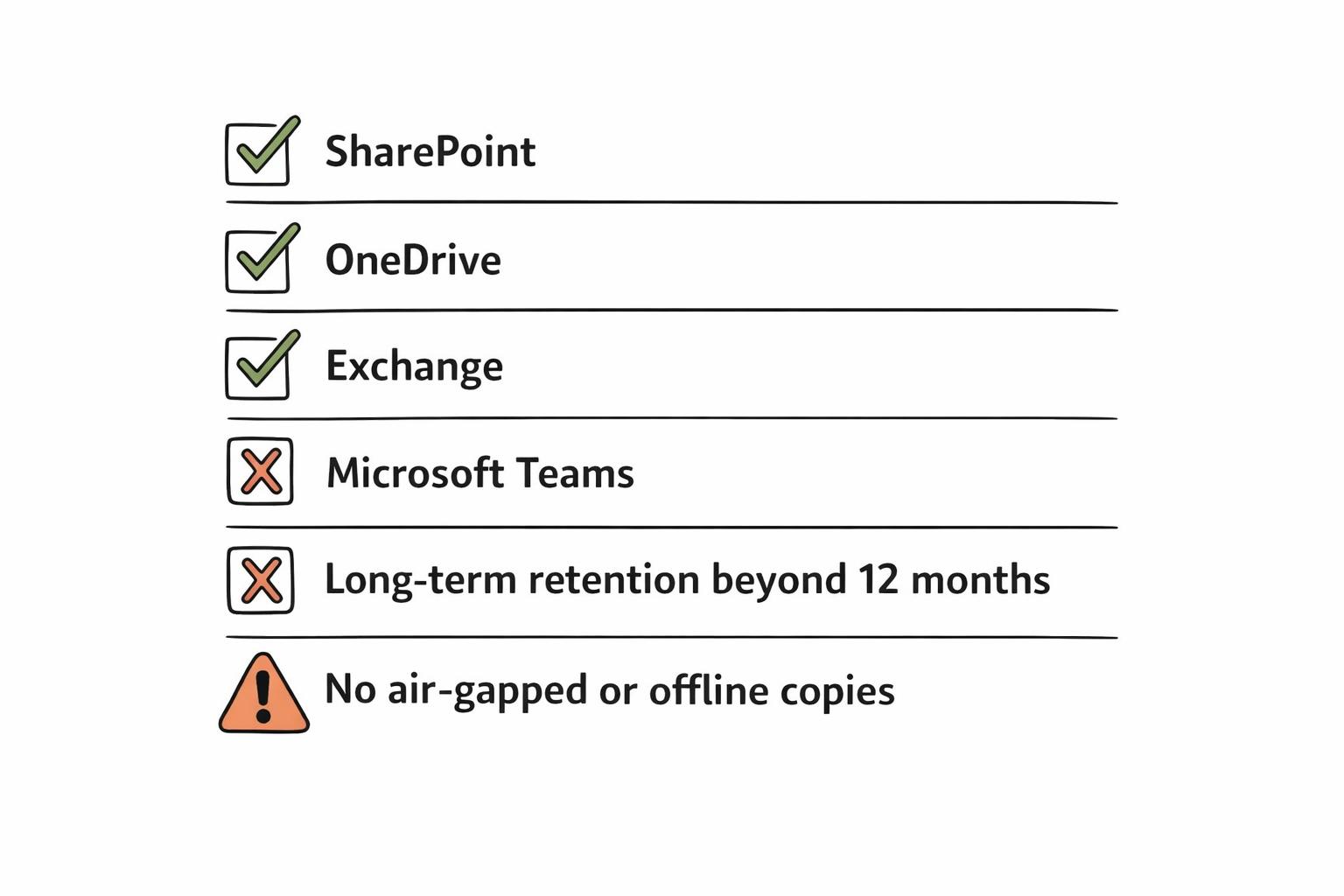
The first is Teams. M365 Backup does not support backup of Teams at this point. If your organisation relies on Teams for most of their operational and tactical planning in the field (and numerous Australian organisations do), this is a major gap that will need to be supported by a secondary product or a backup storage partner.
This ‘feature’ can be a straight hair-pull moment for unaware local organisations in the construction, mining and professional services sectors where fast-paced communications channels such as Teams are the lifeblood of the organisation. And many operational projects can maintain key data or instructions in a chat thread.
Then there are retention limits at 12 months. For operational recoveries, this is usually fine. But for compliance? This is where things get sticky for Australian organisations. The Privacy Act, APRA CPS 234, and industry requirements in finance or healthcare often mandate seven years or longer. Microsoft has flagged long-term retention for a mid-2026 preview, which won’t help with compliance requests arising before then.
And there is no offline or air-gapped backup capability. All backup data stays within the Microsoft 365 trust boundary. For organisations whose cyber insurer requires “off-site immutable backup” or whose compliance framework mandates air-gapped copies, native backup alone won’t satisfy those requirements.
Government Community Cloud is not supported yet but presumably will be at some point down the line. The roadmap does not currently include a specific release date.
The per-GB model, and in practice this has proven problematic for many of our customers – particularly SMBs with tight financial control and predictable operational expense expectations. Costs can also escalate quickly for organisations with large SharePoint repositories.
It’s important to scope the numbers vs what they’ve assumed. Rather than a predictable billing model this “pay-per-use” model appears to be much better suited to very large or Enterprise customer bases who can more easily afford it.
These gaps, combined with Essential Eight backup maturity requirements, cyber insurer questionnaires, and mandatory ransomware payment reporting obligations have left native Backup on M365 unsuitable as a standalone option for many organisations.
💡 Expert Insight: Alex Stewart, General Manager
When you’re reviewing an organisation’s M365 backup posture, what’s the gap that concerns you most: retention depth, Teams coverage, or something else?
Are you seeing cyber insurers specifically ask about M365 backup as part of their underwriting questionnaires?
What This Means for Your Organisation
There’s no single right answer here. The best Microsoft 365 backup strategy depends on your specific situation. Here’s how to think about it.
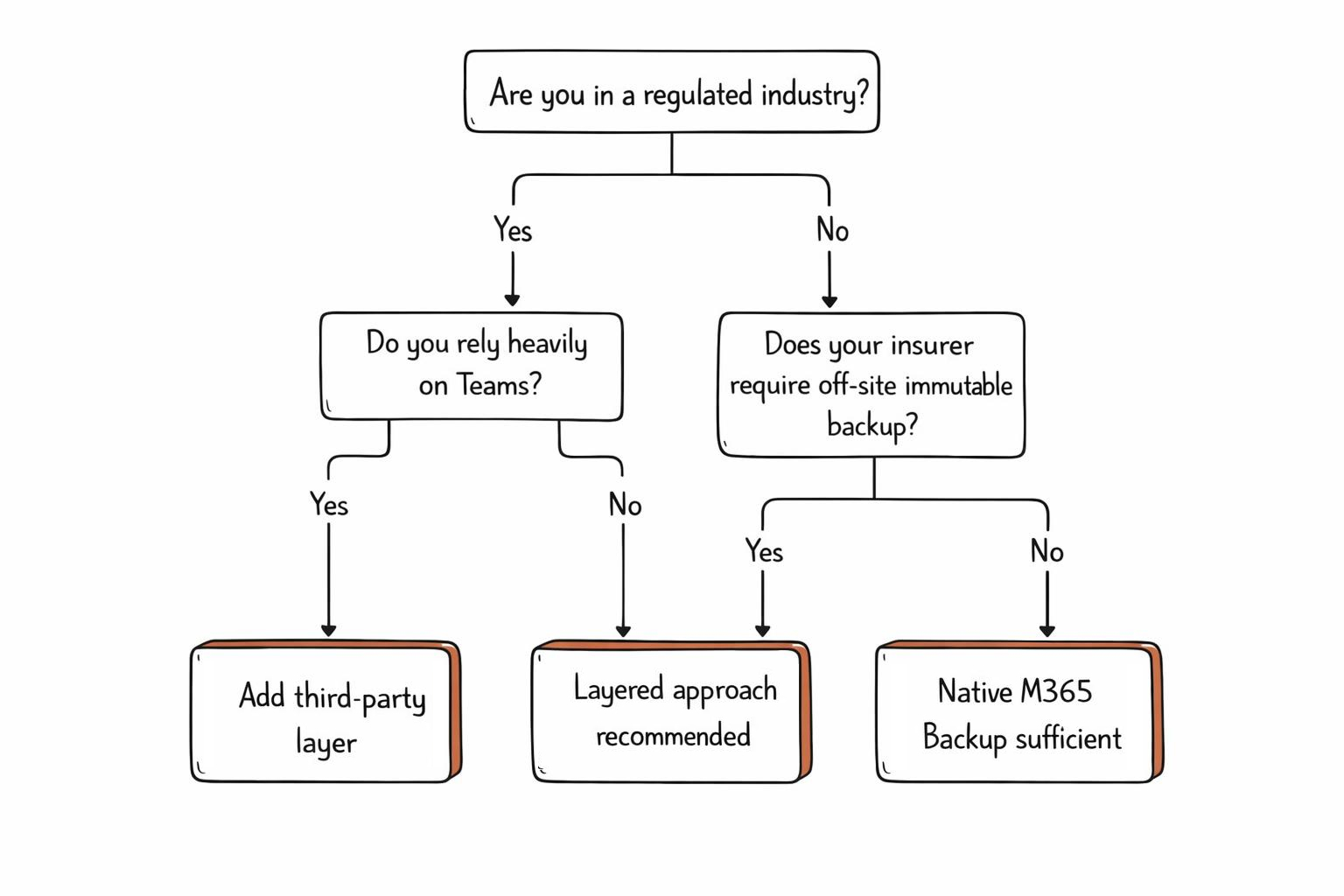
When native M365 Backup is likely sufficient: You’re a smaller team with standard compliance requirements, your primary workloads are SharePoint, OneDrive, and Exchange (not Teams-heavy), you’re comfortable with one-year retention, and you want the simplest possible setup with no third-party tooling to manage.
When a third-party layer is warranted
You’re in a regulated industry (financial services, healthcare, government suppliers) with long retention mandates. Your organisation relies heavily on Teams for daily operations. Your cyber insurance policy requires off-platform, immutable backup copies.
You need to demonstrate compliance with Essential Eight Maturity Level 2 or above. Or you’re an MSP that needs centralised management across multiple client tenants.
When you need both
Many organisations are landing on a layered approach, using Microsoft 365 Backup for fast operational recovery (“get back to work in hours”) alongside a third-party tool for long-term compliance retention and immutable off-site copies. This gives you the speed and simplicity of native backup for day-to-day incidents, with the depth and flexibility of a dedicated backup solution for regulatory and insurance requirements.
Regardless of which path you choose, the question isn’t “do we need M365 backup?” It’s “does our backup strategy satisfy our obligations?” That means mapping your approach against mandatory ransomware reporting requirements, Essential Eight backup maturity targets, and the increasingly specific questions that cyber insurers are asking on their underwriting forms.
💡 Expert Insight: Alex Stewart, General Manager
The most common issues when reviewing are organisations M365 backup posture is relying on and assuming that Microsoft’s options will cover you, relying on items like Recycle Bins, Retention Policies, Litigation holds and Native retention. These are not backups.
The biggest gap is backups not being tested or monitored and orginisations assuming backups are continuing to work, or not including newly installed/created items into the backups
Your Next Steps
Microsoft 365 Backup is a step forward, but it’s not a set-and-forget solution. The right strategy depends on your workloads, your compliance obligations, and your risk appetite. Whether native backup is enough or you need a layered approach, the important thing is to have a strategy and to test it.
At TechBrain, we help Australian businesses assess their M365 backup gaps, design a strategy that meets their regulatory and insurance requirements, and implement it without disruption. Here’s where we can help:
- Cyber Risk Assessment: Identify where your current backup posture falls short against Essential Eight, APRA CPS 234, and cyber insurance requirements.
- Managed IT Services: Ongoing backup management, monitoring, and recovery testing. So you’re not finding out your backups don’t work during an actual incident.
- Microsoft 365 Security Hardening: Backup is one layer of a broader security posture. Through our TechSafe managed security service, we configure the full stack, from conditional access to data loss prevention.
Not sure if your M365 data is properly backed up? That’s exactly what we help Australian businesses figure out, whether you’re based in Perth, Sydney, or Melbourne. Book a cyber risk assessment with TechBrain.
Sources
- Australian Signals Directorate. Annual Cyber Threat Report 2024–25. Australian Government, 2025. https://www.cyber.gov.au/about-us/reports-and-statistics/annual-cyber-threat-report-2024-2025
- Australian Government. Cyber Security Act 2024 (Cth). Federal Register of Legislation, 2024. https://www.legislation.gov.au/C2024A00090/latest/text
- Australian Government. Privacy Act 1988 (Cth). Federal Register of Legislation, 1988. https://www.legislation.gov.au/Series/C2004A03712
- Australian Prudential Regulation Authority. Prudential Standard CPS 234: Information Security. APRA, 2019. https://www.apra.gov.au/information-security
- Australian Signals Directorate. Essential Eight Maturity Model. Australian Cyber Security Centre, 2025. https://www.cyber.gov.au/resources-business-and-government/essential-cyber-security/essential-eight
- Microsoft. Microsoft 365 Backup overview. Microsoft Learn, 2025. https://learn.microsoft.com/en-us/microsoft-365/backup/backup-overview
- Microsoft. Microsoft 365 Backup FAQ: Shared Responsibility. Microsoft Learn, 2025. https://learn.microsoft.com/en-us/microsoft-365/backup/backup-faq
- Microsoft. Microsoft 365 Backup Storage partner program. Microsoft Adoption, 2025. https://adoption.microsoft.com/en-us/microsoft-365-backup/