
Share


Author
In this article
In October 2023 the British Library suffered a ransomware attack. Fortunately for them, they already had secure copies of all their digital collections. In the words of the Library, however, it lacked “viable infrastructure on which to restore it”. Months later, and the rebuild was still ongoing. The backups had survived the attack, but the recovery had proven to be a much harder problem to solve.
Most resources on immutable backups have been provided by vendors of the storage themselves, often focusing solely on how to create the backups.
This article focuses on two key halves of being able to recover from an incident and completes a series of three articles on the topic of incident response and recovery (July and September already covered the plan and a simulation of the plan’s use respectively).
First, creating a viable recovery copy that cannot be altered or deleted by an attacker. Second, testing the ability to recover from those copies and collating evidence of those tests on a single page that can be reviewed by your board and your insurer.
But first, let’s start with the basic definition: An immutable backup is a backup that can’t be altered or deleted until the retention period for that immutable backup has passed. Testing your ability to recover from failures such as a ransomware attack is needed to prove that data, systems and people can restore services quickly enough to prevent unreasonable disruption to business.
Key Takeaways
- Some 89% of organisations in the Veeam 2025 Ransomware Trends report were targeted on their backup repositories.
- Immutable storage protects only the copy and does not help against other forms of attack, for example data theft, already present malware in the backup or attack on the backup system that disabled the backup software.
- An untested restore is an assumption. In ASD’s Essential Eight assessment guide, disaster recovery exercises are expected to be held at least once a year.
- Turn your tests into evidence. Instead of the board and insurer having to rely on your assurance, convert the outcome of each test into dated evidence on a single page.
Ransomware Goes for Your Backups First
In order to extract any ransom from a business with full backups, a ransomware attack first has to target the backups themselves. They’ll aim to either delete or corrupt them before they can start encrypting data elsewhere in the business.
When Sophos carried out its 2026 ransomware survey of 119 Australian organisations and businesses, 57% of them used their backups to restore files that had been encrypted by their attackers. But 57% of them also ended up paying the ransom demands of their attackers and got their files back. (Up from 41% in Sophos’s previous survey, and so a trend worth noting even in such a small sample).
In September 2026, ASD added two new controls to the Information Security Manual for backups. First, the manual now recommends that all backups are stored using a “technically enforced immutability mechanism” that prevents modification or deletion of the backup for the retention period of the backup.
Second, ASD recommends that the backup infrastructure is segregated from the production environment(s) and that administrative access to the backup environment should be done using a separate authentication mechanism.
Note that ASD has no power to force private organisations to follow the Information Security Manual, so all they can do is recommend the two new points on backups.
What Immutable Means, and What It Doesn’t Protect
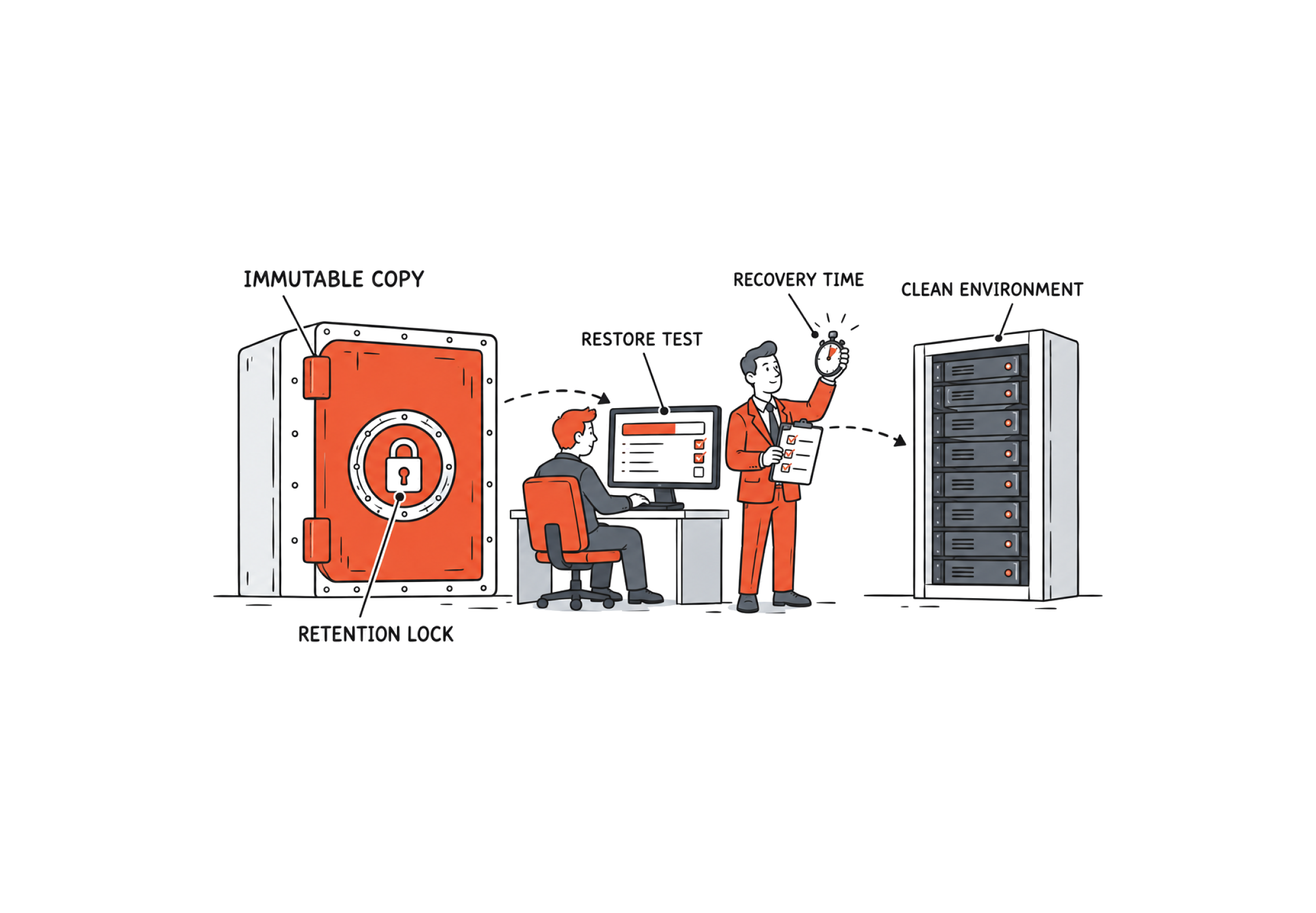
Immutable = backup cannot be modified or deleted until the end of its retention period.
People seem to mix up several terms these days when talking about data protection. Let’s make sure you understand what you actually have, before covering any perceived gaps.
| Term | What it means | What it protects against | Where it falls short |
|---|---|---|---|
| Immutable backup | A copy locked against change or deletion until a set date | Deletion or encryption of the backup, including by a stolen administrator account | It can still sit on the same network and the same sign-in as production |
| Air-gapped copy | A copy with full physical and network separation | Attacks that travel across the network | It is only as current as the last time it was connected |
| Offline copy | Media that isn’t connected or mounted at all, such as tape in storage | Anything that needs a live connection | It is only as current as the last backup written to it |
| Snapshot | A point-in-time image held on the production storage itself | Accidental deletion and quick rollbacks | It depends on the production system, so it can be deleted along with it |
| Replication | A live copy of your data kept in sync at a second site | Hardware and site failure | It copies corruption and encryption as fast as it copies data |
- Immutability will not help to prevent data theft. In 77% of the ransomware cases analysed by Google’s threat intelligence team in 2025, there were signs of data theft.
- It preserves good and bad data alike, e.g. any malware they placed on your system before taking the backup.
- A lock of less time than an attacker is inside will not help to repel the attacker. A seven day lock does not help against an attacker who is inside for three weeks.
- Just because immutable storage has been configured for backup data, does not mean that the entire backup environment has been adequately secured. For example, as reported in Mandiant’s 2026 M-Trends report, attackers deleted the configuration of a backup server, thereby rendering the immutable data on the storage inaccessible. A lengthy engagement with the vendor was required in order to restore access to the data.
So the copy alone isn’t the plan.
💡 Expert Insight: Ashish Srivastava, Head of Cyber Security & Strategy
“When a business advises me that its backups are immutable, the first thing I check is who can make changes, such as shortening retention or turning off immutability. Too often immutability exists, but it is in a mode an administrator can override, or it is controlled by the same production credentials that manage the consoles. Immutability is only as strong as the account that controls it.”
Build a Recovery Copy Attackers Can’t Touch
A useful rule of thumb for determining how many copies of your data to keep is 3-2-1-1-0.
This means three copies of the data, two types of media, one copy offsite, one copy immutable or offline and zero errors when you test a restore.
The first three digits represent the traditional backup rule. The last two digits represent the additional measures that need to be put into place to deal with the threat of ransomware, and that is what this article is about to cover.
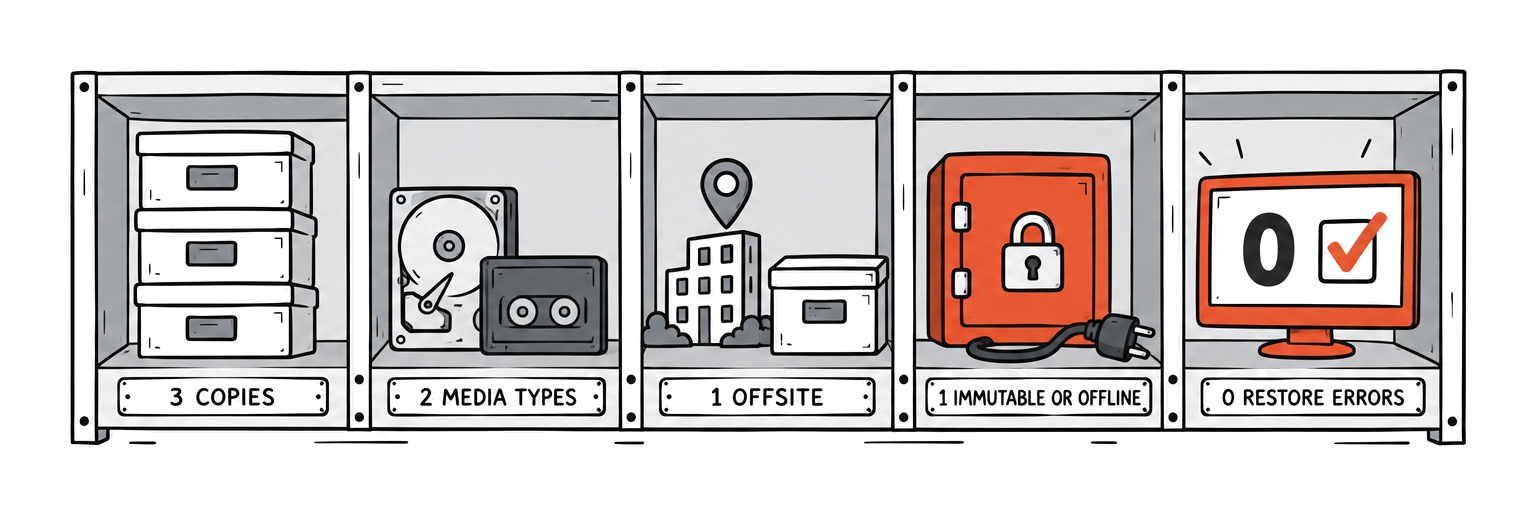
Remember that the 3-2-1-1-0 rule tells you what you need to keep in order to recover from a cyberattack, and these settings help to prevent attack in the first place.
- A separate sign-in for backup administration. This stops a stolen account for production being used to delete backups for recovery in the console. According to ASD’s Information Security Manual, recommended practice for backup administration uses a separate authentication mechanism for backup administration.
- A further lock on the backup administrator accounts so that even they cannot delete or modify the backups during their retention period. In the Essential Eight this is set at Maturity Level Three.
- Retention for the length of time an attacker is likely to be inside your environment. Mandiant’s 2026 M-Trends report, for Asia / Pacific, reports the median time to detection is 15 days with half of the attacks reported continuing beyond this time. The locked copies of data must allow for investigation of what occurred during the attacker’s time inside the environment.
- Security monitoring (in-house or through a third party) should also alert on attempts to delete locked copies or reduce the retention period of copies left behind.
If you store data in services like Exchange Online, SharePoint Online or Teams it’s also worth checking what backup options are available for these services. You’ll find we’ve covered this extensively in this separate article on Microsoft 365 Backup.
Prove It With a Backup Restore Test Plan
A simple backup report with lots of green ticks shows that all your backup jobs ran. But having backups does not mean you can get your business back up and running. That can only be proven by a restore, and there are four levels of restore.
| Level | What you do | What it proves | What it doesn’t prove |
|---|---|---|---|
| 1. File restore | Restore a sample of files to a temporary location and open them | Individual files can be retrieved | That an application or a whole system will come back |
| 2. Application restore | Bring a database or application up from backup and use it | The application’s data is usable and not just present | That the whole service works, sign-in and network included |
| 3. Full system recovery in isolation | Rebuild complete systems in an isolated environment, scan them and time the work | Systems can be rebuilt clean, and how long that takes | That the business can run on them under pressure |
| 4. Disaster recovery exercise | Recover your critical services end to end, in order, with the people who would do it on the day | The business can be brought back under the conditions you tested, and by whom | Recovery from ransomware, if the scenario assumes the backup platform and sign-in systems survived |
For all maturity levels of the Essential Eight, backup recovery is tested as part of the disaster recovery exercises, as outlined in the ASD’s assessment guidance. Note that business-as-usual recovery of user files is not sufficient. Rather, you should test your ability to restore a significant portion of a system in a scheduled exercise.
In between the exercises, test a sample. The test for the same objective in the CIS Controls is to test backup recovery for a sample of systems on a quarterly basis or more frequently.
This can then be recorded against a set of metrics (such as what has been recovered, how long it took to recover it against your defined time, what amount of data loss has occurred against your defined amount, did you recover into an isolated environment first, did you check for signs of the attacker on the restored systems and any failures).
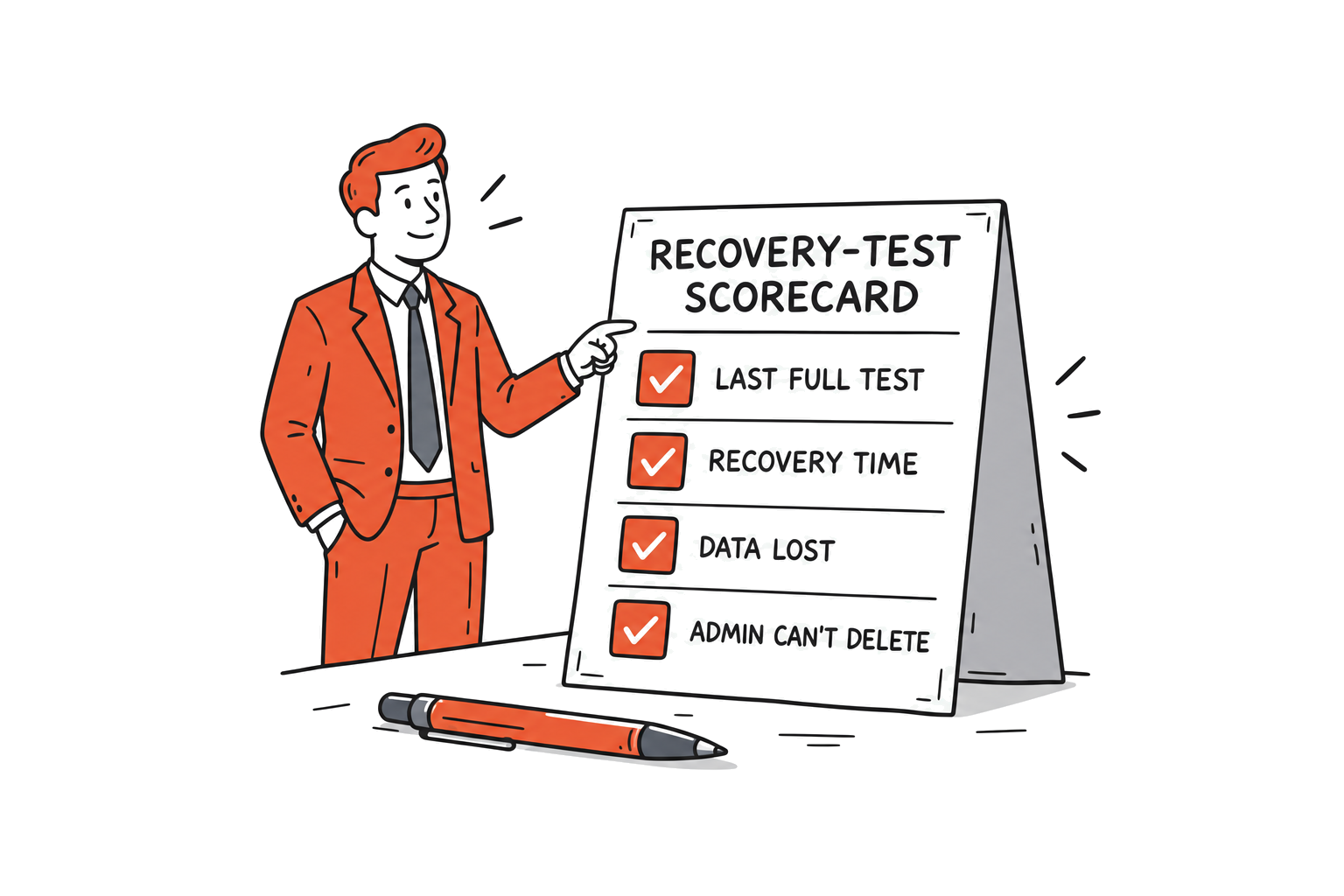
| # | Question to ask | What good looks like | Guidance it maps to |
|---|---|---|---|
| 1 | When was the last full restore test? | A dated exercise in the past 12 months, with sample restores each quarter | Essential Eight, ASD assessment guide, CIS Control 11.5 |
| 2 | Which systems were restored? | The systems the business can’t trade without, and never just a sample file | ASD assessment guide |
| 3 | How long did recovery take against the target? | A measured time, set against a recovery time the business has agreed | Your recovery time objective |
| 4 | How much data was lost against the target? | A measured gap, set against a limit the business has agreed | Your recovery point objective |
| 5 | Did the restore go into an isolated environment first? | Yes, and the restored systems were checked before going back into production | NIST CSF 2.0, RC.RP-05 |
| 6 | Were the backups verified before use? | Yes, each backup was checked for corruption and signs of compromise | NIST CSF 2.0, RC.RP-03 |
| 7 | Can a backup administrator delete backups inside retention? | No, and someone has tried it to make sure | ISM-2151, Essential Eight Maturity Level Three |
| 8 | Is backup administration on its own sign-in? | Yes, separate from the production directory | ISM-2152 |
💡 Expert Insight: Ashish Srivastava, Head of Cyber Security & Strategy
“In my experience, a first full restore test rarely fails on the data recovery. It fails on everything around it, the undocumented restore priority, a configuration that’s held only on the server that was lost, or a recovery that takes far longer than the business assumed.”
Restore in the Right Order, Into a Clean Environment
Shut the door before you start to recover in case you inadvertently recreate the incident. The “close the way in” gate must be confirmed before recovery can progress past it.
Then recover in tiers.
| Order | What comes back | Why it goes here |
|---|---|---|
| First | Close the way in | Restoring while the attacker still has access hands the rebuilt systems straight back |
| Tier 1 | A clean, isolated environment and the backup platform | You need somewhere safe to restore to and the tool that does the restoring, which is one reason the platform needs its own sign-in |
| Tier 2 | Identity and DNS | Nothing else can sign in or find anything until these work |
| Tier 3 | The systems you can’t trade without | The business sets this order, and agrees it in advance |
| Tier 4 | Everything else | In priority order, as capacity allows |
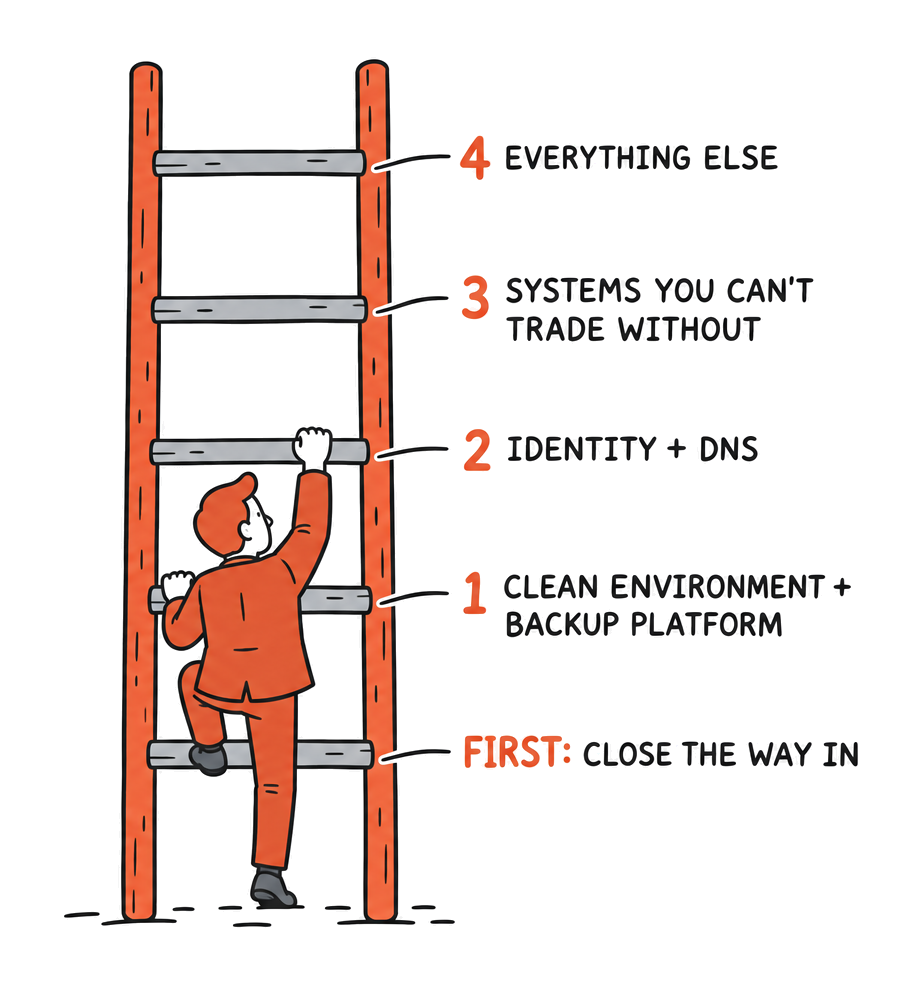
We recommend that for every tier of restoration, two things are verified: 1) that the correct backup has been selected for restoration, and that it does not contain the malware of the attacker, 2) that the chosen restore point is prior to the attacker’s gain of entry. This ties back to the need for sufficient retention of backups.
Think back to our British Library example from earlier, they had copies of data on hand… however the environment to restore back to was not viable.
The tabletop exercise to rehearse the sort of decisions that are needed to recover from disaster while under the stress and pressure of a mock incident is critical in these circumstances (we covered this in September).
But just as important, (and often forgotten) is the technical rehearsal of the recovery process.
Turn Restore Tests Into Board and Insurer Evidence
Until recently, reassurances were often enough to convince directors and insurers that an adequate disaster recovery plan was in place. However, with rising risk, these individuals are increasingly demanding evidence to support your cyber posture, not just words.
If you are a board member or owner of a business, ask your IT department or supplier three key questions.
- What is the date of your last full restore test and what systems / data was included in the test?
- How long did the recovery take and is this within time that the business can operate with?
- Can a backup administrator delete our backups inside the retention period?
A confident answer will be a date with a number against each of the questions above. A vague answer will lead you to your first finding.
Cyber insurers are already requesting similar information on their proposal forms for cyber insurance for Australian businesses. Our article on what cyber insurers ask about backups outlines the remainder of the information needed to provide evidence of the organisation’s backup and recovery systems and processes.
Recently, Australian Clinical Labs was fined for breach of the Privacy Act (a $5.8 million penalty was imposed in 2025). As part of the judgment, deficiencies were found that included “specific data recovery plans had not been developed.” (As a Privacy Act matter, no ruling on data backups was made, but it does go so far as to highlight what the regulator looks for with respect to data protection after an incident has occurred).
We recommend sample restores to be undertaken on a quarterly basis and a full test of business recovery annually (quarterly based on CIS Controls, with annual full test of business recovery recommended by ASD).
💡 Expert Insight: Ashish Srivastava, Head of Cyber Security & Strategy
“I’d encourage boards to look beyond the report and ask for the date of the last restore test, the systems covered, measured recovery against RTO and RPO, and the lessons learnt for improvement. When a client tells me they test their backups, I check that the restore came from the protected copy, covered critical systems, stayed within Maximum Tolerable Downtime and followed the documented DR plan.”
How TechBrain Helps
At TechBrain, we provide immutable backup copies and scheduled restore testing as a standard part of our managed backup services.
Supplemented by our recovery planning, managed SOC and managed SIEM monitoring services. All delivered within our ISO 27001 certified management environment by an Australian-based team of experts.
- Managed data backup that includes immutable copies of your data and regular scheduled tests of data recovery.
- Managed SOC and managed SIEM enable detection of an incident in sufficient time to respond prior to significant damage occurring.
- Essential Eight assessment and TechSure cyber risk assessment.
Remember, a backup you’ve never restored is only an assumption, book a cyber risk assessment and find out how your recovery would really go.
Sources
- Learning lessons from the cyber-attack, British Library (review published 8 March 2024). bl.uk
- Information Security Manual, September 2026 (ISM-2151 and ISM-2152), Australian Signals Directorate. cyber.gov.au
- Essential Eight Maturity Model (November 2023), Australian Signals Directorate. cyber.gov.au
- Essential Eight Assessment Process Guide, Australian Signals Directorate. cyber.gov.au
- From Risk to Resilience: 2025 Ransomware Trends and Proactive Strategies, Veeam (press release, 23 April 2025). veeam.com
- The State of Ransomware in Australia 2026, Sophos (July 2026). assets.sophos.com
- Ransomware Tactics, Techniques, and Procedures in a Shifting Threat Landscape, Google Threat Intelligence (17 March 2026). cloud.google.com
- M-Trends 2026, Mandiant (24 March 2026). gstatic.com
- CIS Critical Security Controls v8.1, Safeguard 11.5, Center for Internet Security. cisecurity.org
- The NIST Cybersecurity Framework (CSF) 2.0, NIST CSWP 29 (February 2024). nvlpubs.nist.gov
- Security Guidelines for Storage Infrastructure, NIST SP 800-209 (October 2020). doi.org
- Australian Clinical Labs judgment, [2025] FCA 1224, Federal Court of Australia. judgments.fedcourt.gov.au and OAIC media release. oaic.gov.au
- Prudential Standard CPS 230 Operational Risk Management, APRA. apra.gov.au
- The 3-2-1-1-0 rule as described by Veeam (16 March 2021). veeam.com
- Cyber insurance proposal forms: AIG Australia, CyberEdge Ransomware Supplemental Questionnaire. aig.com.au DUAL Australia, Cyber Insurance Proposal Form (08.26). au.dualinsurance.com Emergence, Cyber Event Protection Proposal Form. emergenceinsurance.com
This guidance is general in nature and current as at October 2026. It is not legal advice. Backup and recovery arrangements remain each organisation’s responsibility, so seek advice specific to your circumstances.