


Share


Author
In this article
If three vendors came to you this quarter with three different acronyms and your VPN is running on a box you purchased in 2019, then this article is for you.
This is likely not the first article you’ve come across outlining the SASE architecture. But here, we’ll be moving against the grain, with the vast majority of them vendor centric, describing how a large multi-national with thousands of users could deploy a SASE solution.
Here, we’ll focus on the Australian mid-market, and outline the 3 year cost of a SASE solution. We’ll also cover who is best suited to manage a SASE solution on an ongoing basis, and the evidence a board of directors and an insurer will want to see along the way.
Key Takeaways
- We’re seeing a lot of VPNs getting replaced by ZTNA (Zero Trust Network Access) on a per application basis, allowing access to only the applications that a user needs on a per session basis. Most of the 20-200 seat Australian businesses we work with start here.
- A large number of SASE offerings on the market are actually SSE offerings without SD-WAN. The real single-vendor SASE offerings are targeted at organisations of 200-500 users or so across sites, that are currently in the process of a WAN renewal.
- Cost out the solution over a 3 year term as opposed to the first year of deployment. Consider the dual run period of 3-6 months to run VPN and ZTNA in parallel, and the full exit costs to leave in year 2 or 3.
- There is no requirement for SASE in Australian regulations, whereas APRA CPS 230 and CPS 234, the Privacy Act statutory tort and AML/CTF tranche 2 all ask for evidence of who can access what.
ZTNA is a method of access to private applications, (served from servers in offices or in cloud), all based on identity and/or on device information checked on a per session basis.
SASE is a cloud-native architecture, that comprises all security services provided at the service edge, all delivered from cloud, and that encompasses ZTNA at its core, as well as SD-WAN and other functions, that are required to secure access to all applications.
So it’s important to understand, SASE begins with ZTNA, and most medium size businesses we work with start with ZTNA too, since they have already dealt with VPNs for remote access and now are struggling to deal with a large number of cloud security products.
SASE, SSE and ZTNA at a Glance
In short, ZTNA is the layer in the SASE architecture for application access, that checks who can access applications (server or cloud based) with identity and/or information about the device that is requesting access on a per session basis. There are also other security services as part of the SASE and SSE architecture. SASE encompasses SSE as well as the networking aspects.
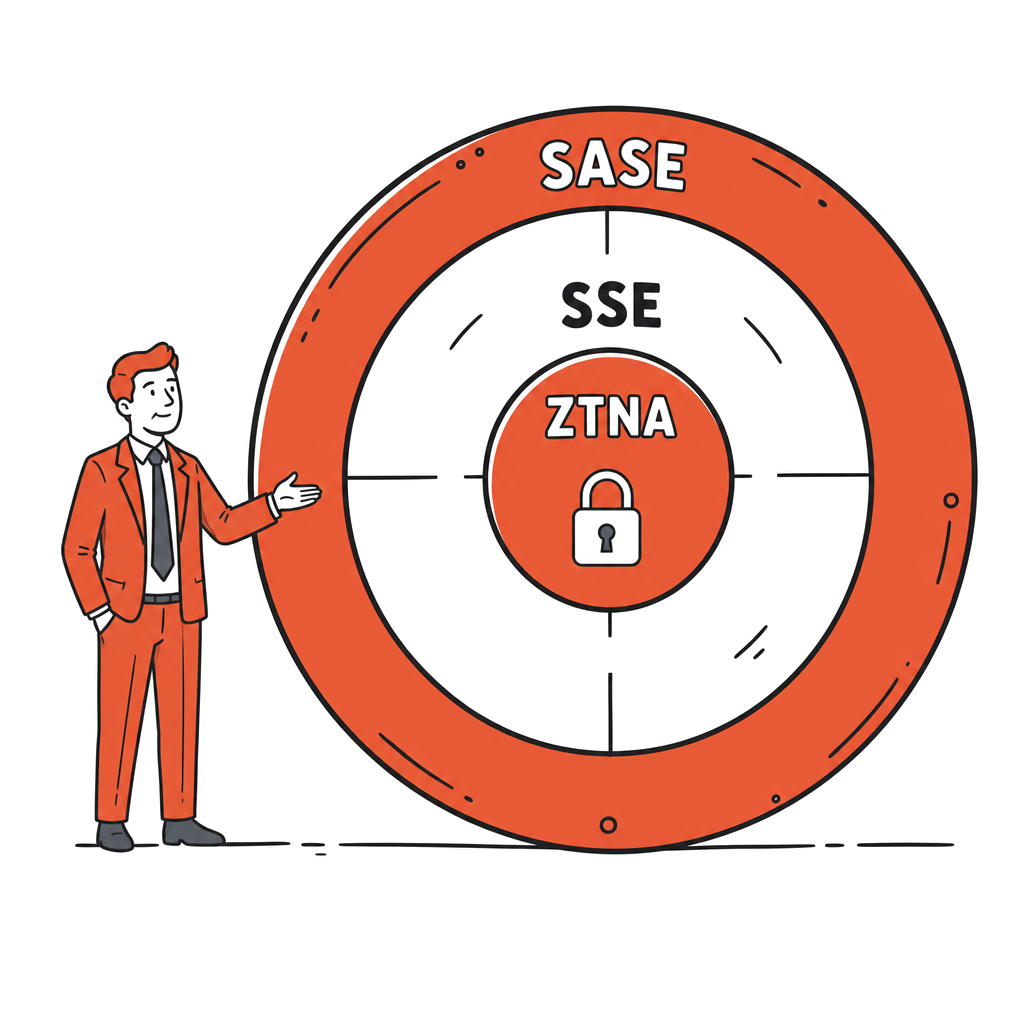
If you are only trying to solve the problem of remote access then you should start with ZTNA.
However, if you’re juggling multiple cloud security products for your business applications, SSE would be more valuable. But if you’re due to renew your wide area networking contracts for all of your sites then full SASE would be worth a look as it will also allow you to design and implement a network that is better aligned to your business’s needs.
What is SASE?
SASE is a Gartner term coined in 2019 for ‘Secure Access Service Edge’ (pronounced ‘sassy’, no relation to stamped envelopes). SASE enables the natural evolution of enterprise networking to the cloud. All users, sites and applications can be connected using cloud-based infrastructure without traffic having to go back to a data centre in between.
SASE has 5 key components that secure access for your users, sites and applications. A SD-WAN solution is required to connect your sites to the cloud applications. A ZTNA solution (Zero Trust Network Access) is then required to secure access to your private applications. On the internet side a SWG (Secure Web Gateway) is required to secure all your web traffic. For your SaaS applications (sanctioned and unsanctioned) a CASB (Cloud Access Security Broker) is required to secure access. Finally a FWaaS (Firewall as a Service) functionality is required to secure all cloud traffic going through your SASE solution. These 5 components can be provided by 1 vendor or a variety of vendors.
Once you have deployed your solution, where in the cloud are you going to send your traffic to be inspected? The key factor here is to understand where the provider’s point of presence (PoP) is closest to your users. The PoP will determine latency for your users, and where in the cloud your traffic is processed. We cover this in more detail in the Microsoft Entra section below. The cloud side of SASE is also a topic we cover in our cloud security posture management guide.
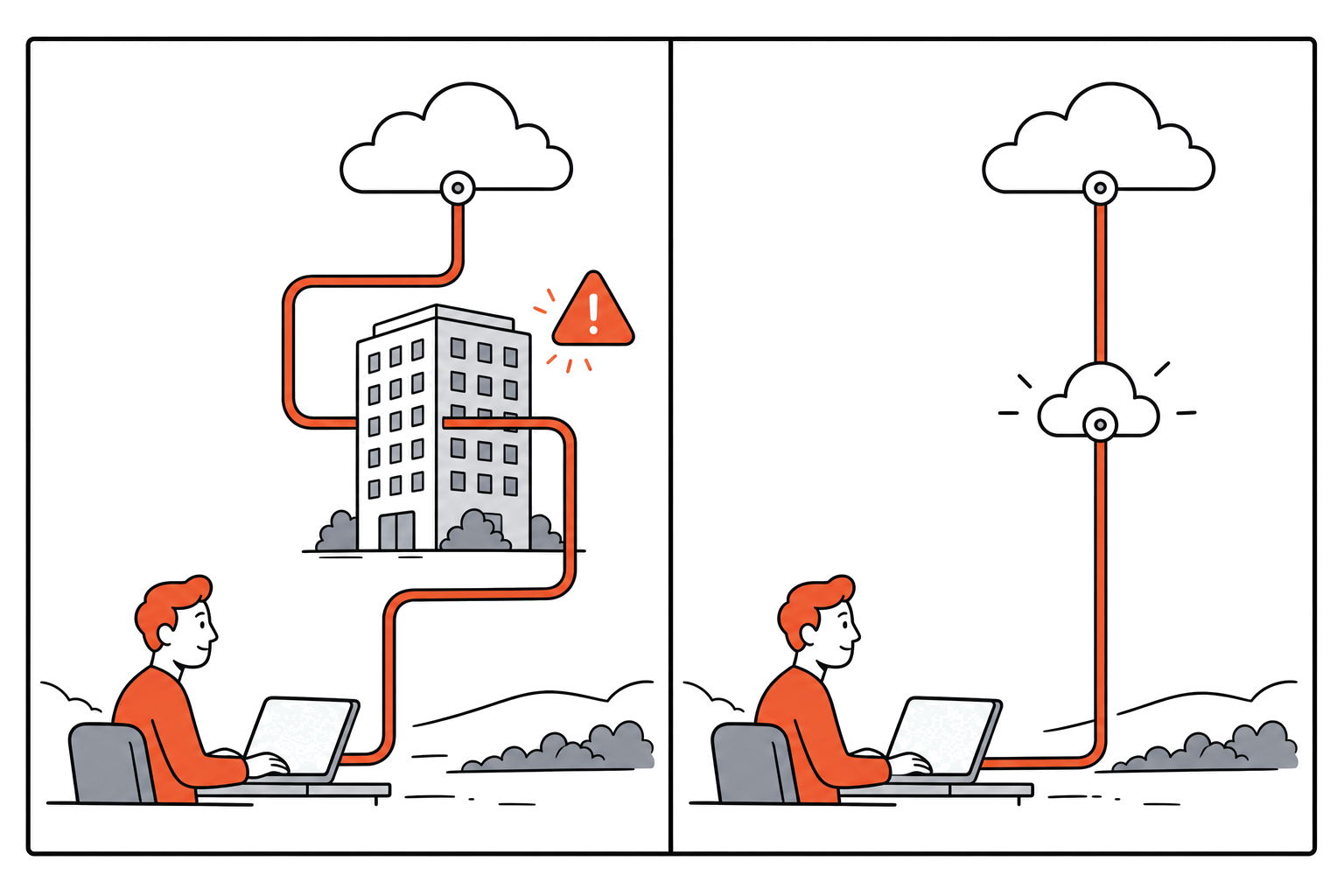
What is ZTNA? The starting point inside SASE
ZTNA = zero trust network access. It is a class of security controls which allow users to access applications and services as opposed to networks. Each connection to an application or service is validated based on identity and/or the posture of the device. The applications which are accessed via ZTNA ‘sit dark’, ie there are no ports ‘listening’ on the internet for incoming connections. Instead the connectors dial out from within your environment.
Traditional VPNs work the other way around, connecting users to networks as if they were local to that network. That single difference, application access versus network access, carries most of the security argument, and we unpack the mechanics in our zero trust architecture guide.
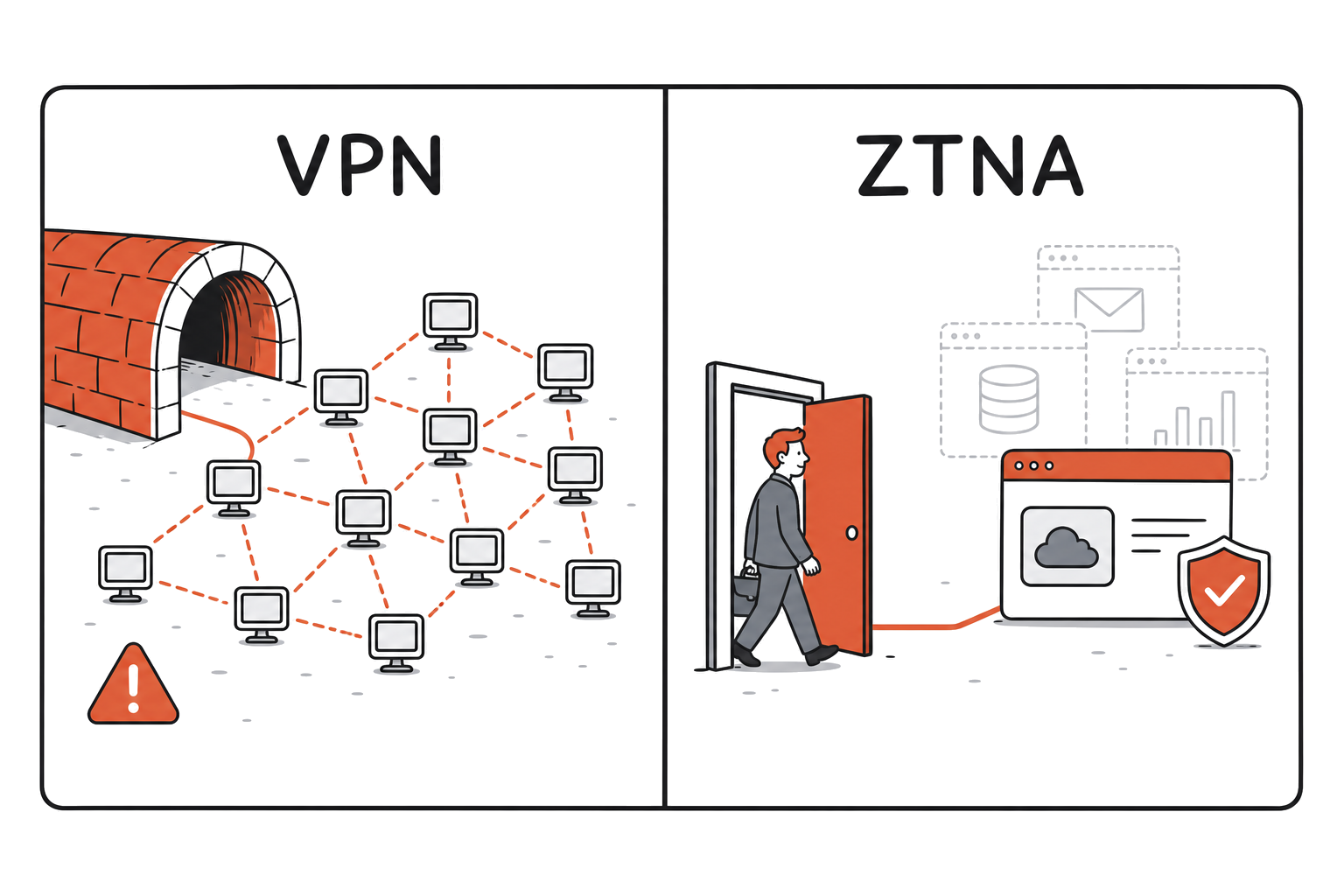
ZTNA is just one of the security controls within a Zero Trust Architecture. It tends to be the fastest paying component of a SASE architecture, and therefore is typically one of the first components that our clients implement.
SASE vs SSE vs ZTNA: the comparison
The term SSE (security service edge) is much more accurate than SASE when referring to the security-only half of the SASE model. In late 2021 Gartner decided to carve out SSE as a separate category for security only solutions, allowing businesses to figure out the SD-WAN networking part later. As such a large portion of the solutions referred to as SASE today are actually SSE only solutions.
| Scope | Includes | Replaces | Best fit | Procurement path | AU regulatory fit | |
|---|---|---|---|---|---|---|
| ZTNA | Per-app access control | Identity-verified access to private apps | Remote-access VPN | 20-200 seats with remote-access pain | Standalone, or first SASE component | Least-privilege evidence for access questions |
| SSE | Cloud security stack | ZTNA + SWG + CASB (often FWaaS) | Web proxy, CASB point tools, VPN | Cloud-first firms consolidating tools | Single SSE platform | Adds web and SaaS control evidence |
| Single-vendor SASE | Networking + security, one platform | SSE + SD-WAN | The above plus branch routers/MPLS | 200-500 seats, multi-site | One contract at WAN renewal | Unified logs simplify audits |
| Multi-vendor SASE | Networking + security, 2-3 platforms | SSE + separate SD-WAN | Same, keeping incumbent kit | Strong existing SD-WAN investment | Staged contracts | Integration effort to unify evidence |
| Legacy VPN + firewall | Network-level access | Concentrator + NGFW | Nothing; the incumbent | Single site, minimal cloud | Appliance refresh cycle | Perimeter evidence only, exposed-edge risk |
SASE vs ZTNA: what is the difference?
In terms of SASE, ZTNA is a control within the SASE architecture, and one of the fastest paying security categories in the market today. A SASE architecture is designed to lock down access to all applications, whether they are on premises or in the cloud.
SASE is a holistic approach, and a broad category of solutions that can include a variety of security functions such as firewalls, web security gateways, and ZTNA. The 2025 Gartner Magic Quadrant for SASE Platforms positions several vendors as Leaders for end to end single vendor SASE, namely Palo Alto Networks, Netskope, Cato Networks and Fortinet (as reported in industry press). Other vendors, such as Zscaler and Microsoft, are primarily classified as SSE first.
Is SASE just a buzzword?
SASE is still a term misused for SSE solutions, and most vendors currently still refer to their security-only offerings as SASE. A number of larger vendors now have fully featured SASE solutions that function end to end as a single vendor solution, but only a handful.
The ACSC never uses the term at all; the controls involved are familiar Essential Eight territory, MFA and limiting admin privilege in particular. Keep your eye on the outcomes rather than the label.
The Decision Framework: Which Fits your Business Today?
The framework below outlines the 6 key questions our experience has shown us to ask in order to define a good starting point. We typically work through these questions with clients to ensure the solution will actually deliver value to the business:
- What do you run today, honestly? VPN age, firewall estate, and any MPLS or SD-WAN contracts still in flight.
- How much of your world is cloud already, and how much still lives in a server room?
- How many contractors, suppliers and unmanaged devices need to reach your systems?
- How many sites do you operate, and when do the WAN contracts renew?
- What will you need to evidence to your board, your auditor, your insurer or a regulator?
- Who runs it: your team, or a managed provider?
After working through these questions, businesses with 20+ users typically start with ZTNA; it’s the first layer of access beyond VPNs still running on 2019 boxes. Then there are the cloud security products you need to manage for deployed cloud applications and services, and this is where SSE comes in.
And lastly, full SASE is suitable for larger businesses with 200+ seats, spread across multiple sites and locations, and with a large wide area network (WAN) contract up for renewal. In most cases, the existing firewalls will remain in place as they already fulfil a number of key roles in the on-premises network, and as yet, no other technology is able to replicate these functions.
| Signal | Start with | Expand when |
|---|---|---|
| Ageing VPN, remote-access complaints, 20-200 seats | ZTNA | SaaS sprawl is documented; add SWG/CASB |
| Overlapping cloud security tools | SSE bundle | Multi-site needs surface at WAN renewal |
| 200-500 seats, multiple sites, WAN renewing | Full SASE evaluation | Phase components as contracts allow |
| Heavy contractor or third-party access | ZTNA, agentless first | Posture checks extend to the managed fleet |
| Single site, minimal cloud | Harden identity and MFA, stay put | Revisit at firewall or VPN renewal |
Every industry will have their own flavour of how SASE will be deployed and many businesses will have unique technical and business requirements that will determine their SASE adoption path.
The mining services companies we work with are a good example, their sites are connected with 4G or Starlink, which creates significant challenges for site-to-site tunnelling.
As ZTNA is always dialling outward to the cloud, setting up and operating it is much easier for them. Mining services companies in this part of the world have sites in very remote locations, so setting up and maintaining traditional wide area network connections is extremely challenging.
Clinics and hospitals, on the other hand, have clinical devices connecting to their IT network, but staff aren’t allowed to touch these devices or install agents on them.
For law firms, they need to prove who has access to particular client matters. Finally, there are many businesses that supply APRA regulated clients. How you connect to those clients becomes their CPS 230 problem, which then needs to be managed as part of your contract renewals.
Since SASE is the next generation of secure access, this is a great time to update your network, even if only some components are due for refresh. This is particularly relevant if your core network components are all likely to fall due for renewal within an 18 month window.
This would include your current wide area network (WAN) contract, whether it be MPLS or SD-WAN, your current firewalls and your current VPN solution. By adopting SASE, you can take the opportunity to review your current network architecture and update to one that more accurately meets your business requirements, rather than individually replacing each of the components.
💡 Ashish Srivastava, Head of Cyber Security & Strategy
“The mistake I see most is treating ZTNA as a technology swap rather than an identity clean-up. Recognised zero trust models treat identity as the foundational pillar for a reason: stale accounts, orphaned admin rights and fragmented identity stores undermine per-session access controls before a single connector goes live.”
The rollout order
Again, while every client is different, they tend to follow a similar pattern. Identity hardening comes first (MFA on remote access, as the Essential Eight expects; our phishing-resistant MFA playbook goes deep on this).
We recommend that clients then implement the ZTNA and run that in parallel with their VPN for a couple of months to ensure that the ZTNA is working correctly (we call this a ‘dual run’).
Once the client has reached the appropriate level of SaaS adoption, then they can implement the SWG (Secure Web Gateway) and/or the CASB (Cloud Access Security Broker). SD-WAN is typically introduced at the time the current WAN contract is up for renewal.
| Phase | Owner | Exit criterion | Rollback |
|---|---|---|---|
| 1. Identity and MFA hardening | IT lead (with us) | MFA on all remote access, stale accounts cleared | Not needed; no user-facing change |
| 2. ZTNA replaces VPN | Security lead | Priority apps cut over, concentrator retired | VPN stays live until the dated exit |
| 3. SSE: SWG and CASB | Security lead | Web and SaaS policy enforced at the edge | Policies run monitor-only first |
| 4. SD-WAN convergence | Network lead | Sites migrated at contract renewal | Site-by-site cutover, links overlap |
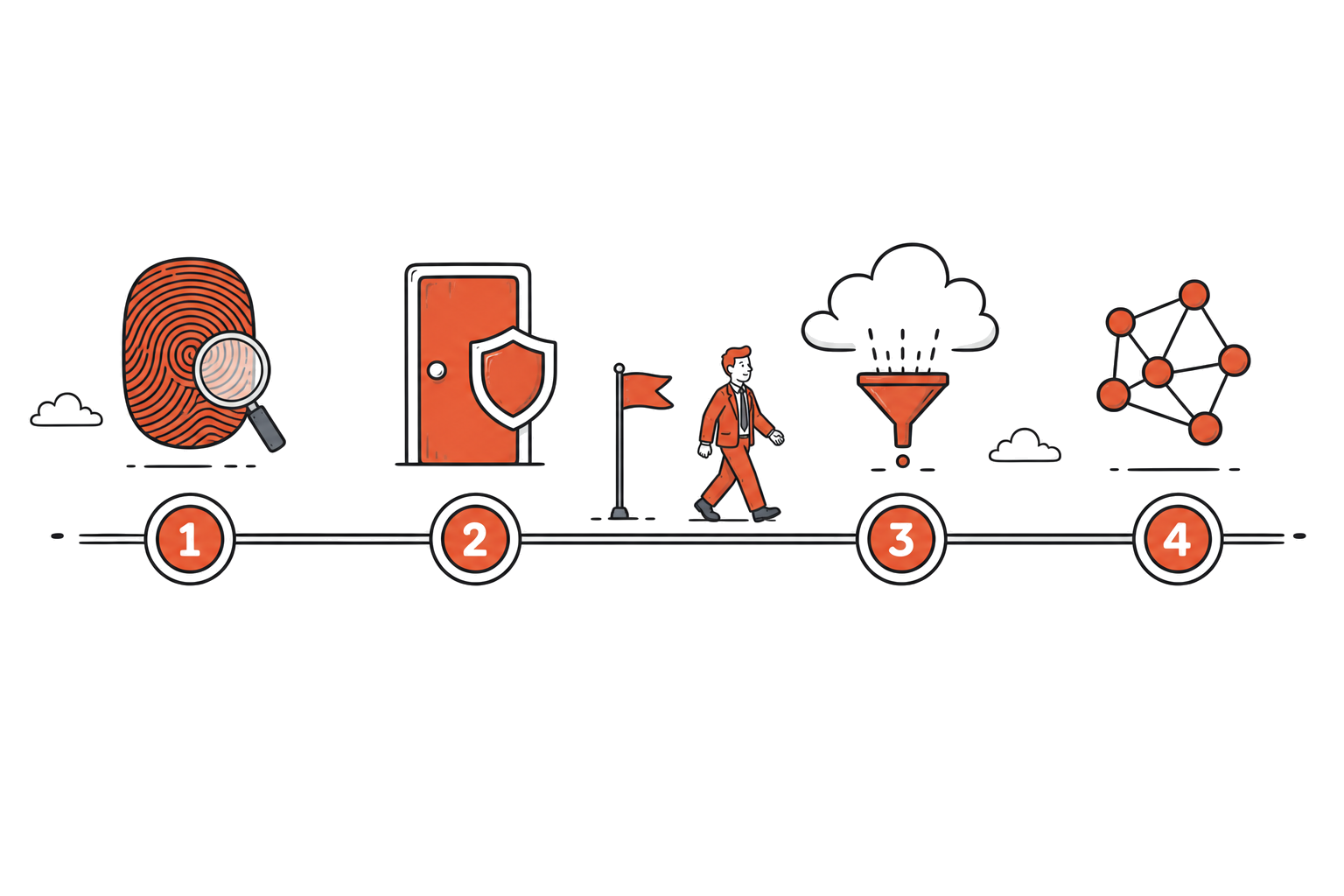
For many businesses the ZTNA step is a great stopping place for the rollout. This step requires more than just great security technology though; it needs a dated cutover plan and a solid exit strategy for the VPN you’ve kept during the dual run. Otherwise the old VPN costs will continue to be drawn for 2-3 years instead of the intended 3-6 months. This is drift, and it must be acknowledged and addressed as it occurs.
The three-year cost question
The cost of a subscription model is linear to the number of users. An appliance requires a large upfront investment, followed by ongoing patching costs and the occasional help-desk call when the old remote access box falls over on a Monday morning.
| Cost bucket | Years 1-3 | Contract risk to check |
|---|---|---|
| Licences (per seat) | Linear and predictable | Minimum seat counts, renewal uplifts |
| Implementation | Front-loaded; weeks not months for ZTNA | Scope creep if identity cleanup is underestimated |
| Dual-run (VPN + ZTNA) | 3-6 months, budget it | Needs a dated exit plan |
| Logging and retention | Grows with usage | Included vs paid add-on |
| Managed operations | Steady monthly | SLAs, support hours, escalation path |
| Exit and data export | The year 2-3 question | Termination assistance, policy portability |
| Retired spend | Offsets the above | Only count what you genuinely switch off |
Before signing, ensure the vendor(s) agree to two items: the dual run period cost and exit costs (including whether your logs and policies leave with you). It is also critical to establish what your current Microsoft licensing already covers you for prior to purchasing alternative solutions.
Why Now?
Across 20 months, Ivanti Connect Secure, Fortinet’s SSL-VPN, Palo Alto’s GlobalProtect and Cisco ASA all had remotely exploitable vulnerabilities in their remote access components.
These were so serious that on two occasions the US government instructed federal agencies to disconnect these products or patch emergently. The ACSC has issued advisories on all of these products as well.
While cloud access is typically touted as a ‘maintenance free’ method of access, the reality is far from this perception. Cloud access must be configured, monitored for unusual behaviour and updated for patches just like any other aspect of your security. With an appliance though, the single point of failure and the point of internet exposure for attack is what creates the large amount of operational burden.
Of employed Australians, 36% now work from home on a usual basis (ABS, August 2025). Even as work moves around, the risk at the edge of the network remains. Australian regulation typically doesn’t detail remote access specifically, but instead requires evidence of who has access, and increasingly, more detail around that access.
| Rule | Who it applies to | The decision question it raises | What SASE does not prove |
|---|---|---|---|
| APRA CPS 234 / CPS 230 | APRA-regulated entities and their material service providers | Can you evidence how third parties, including your IT provider, reach your systems? | Compliance; controls still need testing and reporting |
| Privacy Act + statutory tort (in force since 10 June 2025) | APP entities; the tort applies economy-wide | Can more people reach personal information than need to? | That collection and retention practices are lawful |
| AML/CTF tranche 2 (in force since 1 July 2026) | Real estate, legal, accounting and other tranche 2 entities | Who can reach client-matter and transaction data, and from what device? | An AML/CTF program; access control is one artefact |
| SOCI Act | Responsible entities for critical infrastructure (mining itself is not a standalone sector) | If you supply into SOCI operations, will your access posture survive their CIRMP review? | Sector coverage; check your actual asset class |
| Essential Eight | Guidance benchmark for most private businesses | MFA on remote access and admin restriction: where do you sit? | ‘Compliance’; E8 is a maturity model, not a certification |
To reiterate then, none of the current Australian regulatory requirements specifically require SASE.
However, this does not mean that SASE and related security services are not appropriate for your business today. Instead, SASE should be thought of in terms of whether you can demonstrate who can reach what. A decision of ‘do nothing’ at this time is still a board sanctioned decision, which in itself accepts risk at the edge of your network.
Is Microsoft Entra Global Secure Access SASE?
In short, no. Microsoft Entra Global Secure Access is SSE (security in the cloud, as a service) and no SD-WAN in sight here. It covers two areas: Entra Internet Access (the web gateway product) and Entra Private Access (the ZTNA product). There is also Defender for Cloud Apps which is a CASB (cloud access security broker).
Traffic for the Microsoft profile follows the Entra ID P1 and P2 licences that you are already paying for, so there may be no additional cost for that slice. To extend to the full internet and private access capability, the Entra Suite is charged at US$12 per user per month (US list, at the time of writing). We need to confirm your licensing entitlements for your specific tenant, as the overlap in Entra SKUs is complex, and our Microsoft 365 security checklist is the companion read here.
As a rough guide, some cloud security platforms have more PoPs than others within Australia. Microsoft’s Global Secure Access has PoPs within Sydney, Melbourne and Perth. Zscaler has a data centre in Perth.
Netskope has 5 data centres in Australia. Both Zscaler and Netskope are IRAP assessed to PROTECTED (all of these are vendor published claims, cited as benchmarks rather than recommendations).
Remember that having a PoP within a country does not necessarily mean that the platform is performing data residency for you.
| Platform | AU points of presence | IRAP status | Licence path | SASE or SSE |
|---|---|---|---|---|
| Microsoft Global Secure Access | Sydney, Melbourne, Perth | Microsoft holds IRAP assessments across Azure/M365; GSA-specific scope to verify | Entra ID P1/P2 profile; Entra Suite US$12/user/month list | SSE |
| Zscaler | Sydney, Melbourne, Perth DC | IRAP assessed to PROTECTED | Per-user subscription | SSE-first |
| Netskope | Five AU data centres | IRAP assessed to PROTECTED | Per-user subscription | SSE-first |
That being said, if you are already deep into Conditional Access and other parts of Entra for Microsoft 365 then adding Global Secure Access makes perfect sense as the first step. Branch networking is then a second problem to solve.

Choosing a platform: Five Questions Before you Sign
The following are 5 key questions that we will go through for any platform, whether it is Palo Alto Prisma Access, Zscaler, Netskope, Microsoft or Cato. Every platform has strengths, every platform has different data centre locations and different points of presence, and the brochures do not clearly outline all of the details that we are looking for:
- Is Australian processing confirmed for each service, or is that just a PoP on a map?
- Is this full SASE or simply SSE in disguise marketed as full SASE?
- How deeply does it integrate with our identity provider?
- Who would manage the service on an ongoing basis and from where?
- What are the costs to leave in year 2 or 3, and are the logs and configured policies transferred?
💡 Ashish Srivastava, Head of Cyber Security & Strategy
“The oversight we see most often is treating a local point of presence as proof of sovereignty. A PoP in Sydney or Perth tells you where traffic gets inspected, not where logs and configuration data are actually stored, or where traffic fails over to if that PoP goes down. We work with clients and vendors to confirm all three before ticking that box.”
How TechBrain helps
We help you manage your identity, endpoints and network 24/7/365 through TechSafe, our managed security service. The TechSure cyber risk assessment identifies the required security layers for you.
We map out your current VPN, your current identity provisioning as well as your current cloud provisioning. We calculate all of this against the current Microsoft licensing that you pay for Entra P1 and P2. All done by an experienced, local team with Entra, and Conditional Access sitting under our ISO 27001 certified management system.
We can assess your current situation, identify the required layers of security and cost the implementation to your numbers rather than relying on the hype of the various vendors. Not sure which layer you actually need? Get in touch.
Sources
- Working Arrangements, August 2025, Australian Bureau of Statistics. abs.gov.au
- Essential Eight, Australian Signals Directorate. cyber.gov.au
- Threat actors exploit multiple vulnerabilities in Ivanti Connect Secure and Policy Secure gateways, ACSC joint advisory. cyber.gov.au
- Reported widespread credential exposure affecting Fortinet firewalls and VPN gateways, ACSC. cyber.gov.au
- Emergency Directive 24-01, Mitigate Ivanti Connect Secure and Ivanti Policy Secure Vulnerabilities, CISA. cisa.gov
- Emergency Directive 25-03, Identify and Mitigate Potential Compromise of Cisco Devices, CISA. cisa.gov
- Prudential Standard CPS 234 Information Security, APRA. apra.gov.au
- Prudential Standard CPS 230 Operational Risk Management, APRA. apra.gov.au
- Statutory tort for serious invasions of privacy, OAIC. oaic.gov.au
- AML/CTF obligations and guidance, AUSTRAC. austrac.gov.au
- Guidance for the Critical Infrastructure Risk Management Program, Cyber and Infrastructure Security Centre. cisc.gov.au
- 2025 Magic Quadrant for SASE Platforms and single-vendor SASE market definitions, Gartner, as reported in industry press.
- Global Secure Access points of presence, Microsoft Learn. learn.microsoft.com
- Microsoft Entra Suite pricing, Microsoft, US list price at the time of writing.
- IRAP assessment and Australian data centre announcements, Zscaler. zscaler.com
- Netskope completes IRAP assessment, Netskope. netskope.com