



Share


Author
In this article
In 2024, Aussie businesses were getting hit by a cyber-attack as often as every 6 minutes, according to the Australian Cyber Security Centre. One Sydney manufacturer recently found themselves in a world of trouble when a ransomware attack locked up their entire operational database, putting years’ worth of customer data and engineering specs right on the line.
A lot of businesses in the same situation would have been offline for weeks. This team was back in 48 hours. The difference was a well-designed cyber-attack disaster recovery plan.
With attacks rising across Australia and the average cost of a data breach sitting at $3.35 million, the question is not if but when. For IT managers and business leaders, a robust Disaster Recovery Plan is about business survival, not just technology choices.
Traditional security on its own is no longer enough. Modern attacks are coordinated, often hit multiple systems at once, and can sit undetected for months before they trigger. That reality calls for a comprehensive approach to recovery that goes far beyond a basic backup routine.
So what is a Disaster Recovery Plan?
It is a core part of your organisation’s business continuity planning. The goal is to restore critical systems and data after a major disruption, whether that is a cyber-attack, a natural event or an equipment failure. Done well, disaster recovery minimises downtime, keeps the business operating and supports your regulatory obligations.
Think of your business as a finely tuned machine where every component matters. When disruption hits, disaster recovery is the key that brings the machine back to life quickly, reducing the impact on essential operations and protecting the trust of your customers and stakeholders.
How to Create a Disaster Recovery Plan
- Pinpoint Your Critical Systems and Data: Work out which systems and data are essential to your business and need to be restored pronto in the event of a disaster. This includes customer databases, financial records and operational systems that are critical to keeping the wheels turning.
- Work Out Your Risks and Threats: Identify potential risks and threats to your business systems and data – cyber-attacks, natural disasters and equipment failure, to name a few. The more you know, the better equipped you’ll be to develop targeted response actions.
- Develop a Response Plan: Create a plan to respond to a disaster, including procedures for when the unexpected hits and what to do right away to mitigate damage. This plan should outline the key steps to take immediately after an event to start recovery.
- Establish a Disaster Recovery Team: Work out the roles and responsibilities of your disaster recovery team, including the IT pros, stakeholders and regulators. Each team member needs to know their role in the event of a disaster.
- Develop a Communication Plan: Create a plan to communicate with stakeholders, including employees, customers and regulators during a disaster. Clear communication is key to keeping trust and co-ordinated response actions.
- Test and Review the Plan: Regularly test and update the disaster recovery plan to make sure it’s still relevant and effective. This includes running drills and revising the plan based on lessons learned and changes in the threat landscape.
By following these simple steps, organisations can create a robust disaster recovery plan to tackle potential threats and respond quickly and effectively when disaster strikes.
Key Components of an Australian Cyber Attack DRP
Risk Assessment & Business Impact Analysis (BIA)
Get a clear picture of your organisation’s digital landscape:
Critical Assets to Protect:
- Customer databases with sensitive customer info
- Financial systems connected to Australian banking networks
- Operational systems that are essential to supply chains
- Employee data and compliance records
Impact Metrics to Consider:
- How long can you afford to be down for each system?
- How much will downtime cost you (for e-commerce or retail, that’s a significant consideration)?
- How quickly do you need to recover your data?
- Compliance obligations to keep on top of
Roles & Responsibilities
Your incident response team needs clear roles and responsibilities, like emergency services at the scene of an accident:
Recovery Director (CIO/IT Manager):
- Coordinates the recovery efforts
- Makes critical decisions
- Keeps the execs up to speed
Technical Team Lead:
- Manages the hands-on recovery
- Directs the restoration of systems
- Coordinates the technical staff
Communications Coordinator:
- Handles stakeholder updates
- Ensures regulatory compliance
- Manages media relations
Data Backup Strategy
Good backup solutions require multiple layers of protection:
Geographic Considerations:
- Offsite backups across multiple Aussie locations
- Cloud redundancy for multi-timezone operations
- Local backups for quick recovery
Implementation Requirements:
- Ensure Australian data sovereignty compliance
- Regular integrity testing
- Automated backup systems
Communication Protocol
Your communication plan needs to cater for Australia’s unique requirements:
Stakeholder Templates:
- Customer notifications (Privacy Act compliant)
- Supplier updates (protecting sensitive info)
- Regulatory reports (federal and state)
- Internal briefings
Timing Requirements:
- OAIC notification within 30 days* Regular stakeholder updates – keeping everyone in the loop
- Crisis Communication Procedures – for when things really go wrong
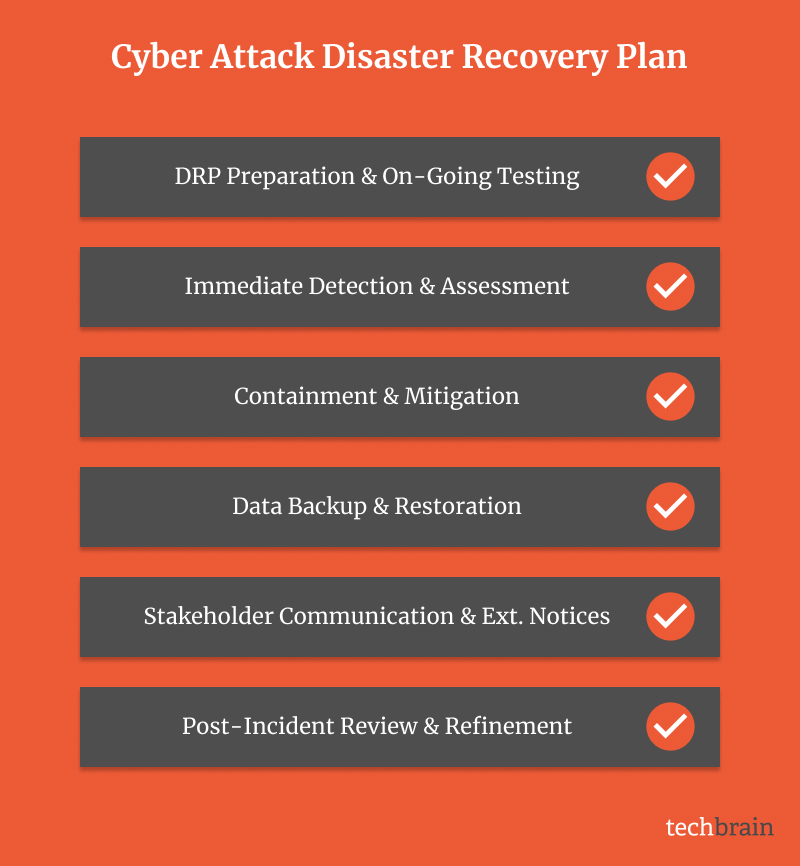
Step-by-Step: On-Going Cyber Attack DRP Template & Checklist
Preparation & Prevention
Proper preparation is at the heart of disaster recovery – and for Aussie businesses that means preparing for our unique regulatory landscape and business practices.
First off, get a comprehensive list of all your systems and IT assets – not just the tech stuff, but how they all work together to keep the business running. For example, a hospital will need to map out their patient management system and how it interfaces with Medicare and other government services.
When setting your recovery goals, think about what’s going to take to get back up and running – both from a technical and business perspective. Your Recovery Time Objective might need to account for business hours across our different time zones, and your Recovery Point Objective has to be smart enough to keep up with our data retention requirements.
Immediate Detection & Assessment
The first sign of a cyber-attack can be pretty subtle – unusual system behaviour, weird network traffic or some suspicious login patterns. You need to tailor your detection process to your business. For example, a Sydney-based finance company is going to need to set up different alerting thresholds during ASX trading hours versus overnight.
When you start to suspect an incident, you need to have a clear process to evaluate what’s going on, and this should include:
Thinking about the time zones – especially if you’re working with international security teams or suppliers. A breach in Perth might need a super-quick response from teams on the east coast before everyone goes home for the day.
Knowing the regulatory reporting requirements – including the need to notify OAIC within the timeframes. Your assessment procedures should tell you if an incident is serious enough to warrant a report.
Working out the potential business impact – across different regions and operations. An incident in Brisbane might have flow-on effects to their operations in Adelaide or Darwin.
Containment & Mitigation
When you finally discover a breach, speed and precision in containment become everything. Think of this phase like implementing quarantine procedures during an outbreak – you need to act fast without freaking out.
Your containment strategy should start with a clear isolation process. For example, if you find some dodgy activity in your Sydney office network, you might need to quickly block it off from your Melbourne and Brisbane operations without disrupting the business.
Aussie businesses need to take extra care with their supply chain when it comes to containment – our geographical position and time zone differences can really complicate things with international vendors and partners. Your plan needs to account for these challenges – perhaps by having local backup options for critical services.
Communication Plan for Stakeholders
In the heat of a cyber-attack, clear communication is as essential as having the right tech.
Aussie businesses have a few unique communication challenges – especially when it comes to our privay laws and mandatory reporting requirements. The OAIC needs to be notified of eligible data breaches within 30 days, so a well-structured communication plan is crucial.
Your communication strategy needs to cover multiple stakeholder groups, each needing different levels of detail and frequency of updates. For example, a Perth-based mining company might need to coordinate comms across multiple time zones and remote sites – their plan might need to account for corporate stakeholders in Sydney and operational teams at remote mine sites.
When you’re building your communication protocols, consider creating pre-approved message templates that tick all the boxes for Australian privacy laws and regulatory requirements. These templates should cover different scenarios – from a minor system outage to a major data breach:
Notifying customers in a way that meets the Privacy Act and lets them know what action they need to take
Updating suppliers in a way that keeps the relationship intact but doesn’t compromise sensitive info – for example, a Melbourne manufacturing business might need to let suppliers know about potential delays without getting into the nitty-gritty of the problem
Notifying regulators in a way that meets state and federal requirements – this is especially important when dealing with multiple jurisdictions
Testing & Drills
Testing your recovery plan is just as important as having the plan itself – just like the emergency drills we do in Aussie schools and workplaces, cyber recovery drills help everyone know their role when the real thing happens.
Quarterly tabletop exercises that walk employees through various scenarios and make sure everyone knows what they do in a real crisis. This might include simulated ransomware attacks, data breaches or system failures – involve key stakeholders from different departments to make sure everyone is on the same page
Annual full-scale simulations that test the whole recovery process – this might involve switching to backup systems, implementing emergency comms and working with external partners. Make sure you include scenarios specific to the Aussie business environment – for example, how to handle a recovery during a public holiday or interstate operations
Regular backup restoration testing to verify that your backups are good and your recovery procedures are sound – especially if you’ve got data stored in different states or offshore
Key Tools & Technologies for Disaster Recovery
The disaster recovery process is constantly evolving, and that means Aussie businesses have access to more sophisticated tools to protect their digital assets. Understanding these tools and how they work helps you make informed decisions about your own disaster recovery strategy and capabilities.
Backup & Redundancy Solutions
Today’s backup solutions offer comprehensive protection through multiple approaches, each serving different recovery needs. When choosing backup solutions, Aussie businesses need to think about our unique geographical challenges and data sovereignty requirements – and choose the ones that tick all those boxes.
Cloud based solutions give organisations with outposts scattered right across Australia’s vast distances a pretty big advantage. Say a Brisbane business uses cloud storage, with two data centres in Sydney and Melbourne. That gives them geographical redundancy – and keeps all their data right here in Australia. It’s just common sense, for both practical recovery needs and meeting all the regulatory requirements.
Local backup solutions still play a vital role, especially for businesses that handle sensitive data or need to get back up and running in a hurry. I reckon a Perth medical practice for example would use local backups of patient records so they can bounce back quickly if the system crashes, and also have cloud backups for long term storage and compliance to keep the regulators happy.
Business Continuity Software
The right business continuity tools will keep your business up and running even when a cyber-attack hits. They work like the safety systems in modern cars – they spot problems before they become a major crisis.
Automated failover is especially important in the Australian context. A Sydney financial services firm can’t afford to be offline during trading hours, so their systems are set up to automatically switch to a backup if performance starts to flag, so they can keep serving their clients.
TechBrain’s Sydney IT support team is a big asset here, with local expertise that really understands the technical needs and business context of your business. Having someone in your time zone responding to issues is a big comfort, and means you can get help when you need it.
Monitoring & Alert Systems
To keep on top of threats you need effective monitoring and alert systems watching your digital infrastructure all the time. This lets you pick up on potential issues before they become a problem, and respond quickly to stop a threat in its tracks. These systems need to be set up to match the way your business operates – and take account of Australian time zones.
Monitoring systems are especially important for businesses with operations in different states – like a business with offices in both Perth and Sydney. You need systems that can handle the fact that its business hours in one place might be the middle of the night in another – but can still spot suspicious activity.
Activity Pattern Recognition
- Watch for business hours activity across time zones
- Keep an eye on access patterns after hours
- Analyse user behaviour
- Track system performance
Alert Configuration
- Set up customised thresholds for different regions
- Use time-zone specific rule sets
- Set up automated triggers for alerts
- Make sure you have escalation protocols in place
Cyber Insurance
Cyber insurance might not be able to prevent attacks, but it’s still a vital part of your risk management strategy. When you’re looking at cyber insurance options, make sure you get a policy that meets all the local regulatory requirements and fits with your business practices.
Look for policies that cover
- The costs of making a mandatory breach notification under the Privacy Act
- Business interruption based on how we operate during Australian business hours
- Legal expenses related to Australian privacy law
- Crisis management support during business hours
Cyber Attacks Dont Wait. Should You?
It’s a lot cheaper to prepare for cyber-attacks than it is to try and recover from them. Just as you check your insurance before a storm hits, you should check your recovery plan well before you need it.
And it doesn’t have to be all at once. Think of building a house – you start with a solid foundation and add layers on. By working with TechBrain’s experts, you get a system that fits your business and meets all the compliance needs, bit by bit – no matter how ready you are.
Take the first step towards digital resilience today. Check out our data backup resources to learn about robust backup solutions, or book a disaster recovery response training session to start building your cyber defences.